
Start here: You can report a Google review that violates policy and use the one-time appeal if Google finds no violation. Disagreement alone is not grounds for removal. Save the review and evidence, choose the relevant policy reason, and prepare a useful public response.
LOOK AT THE EXAMPLE
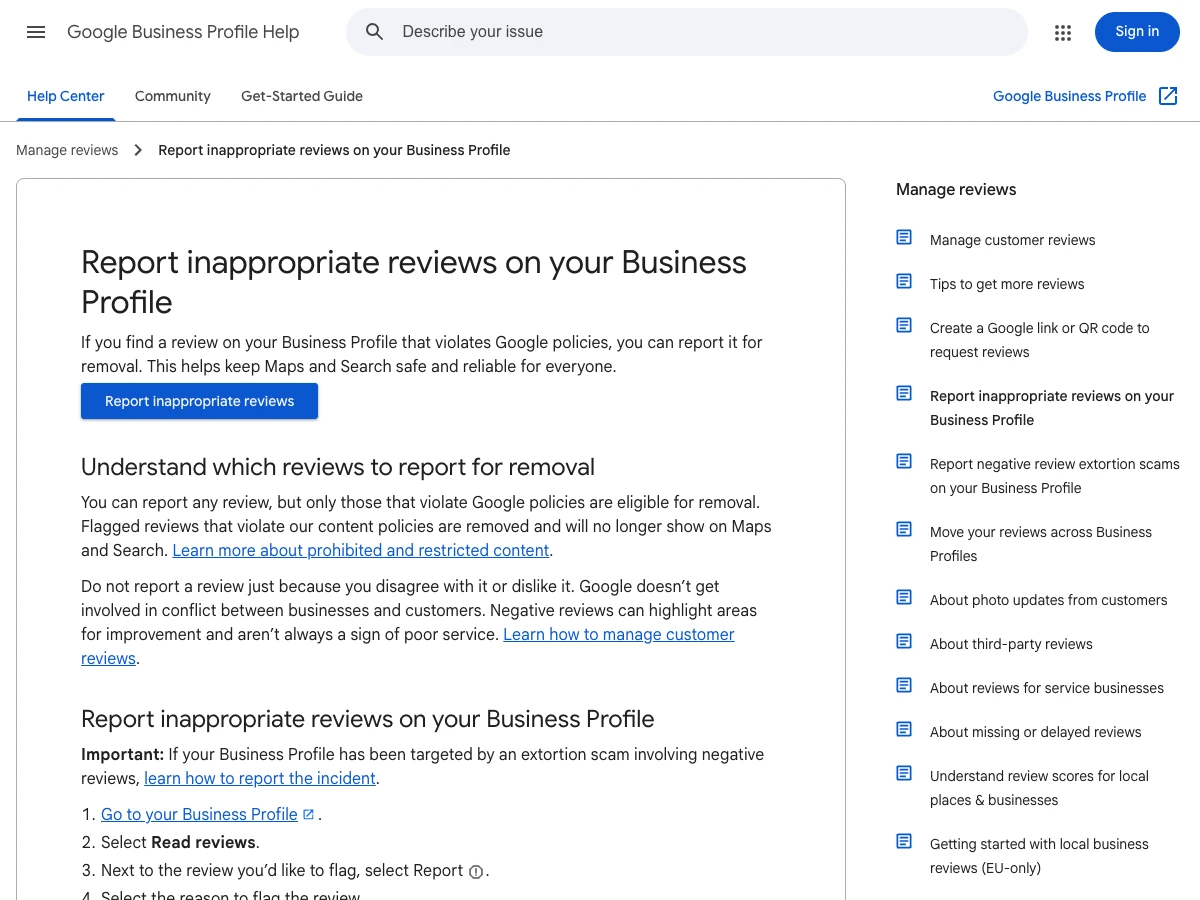
Google’s reporting route asks you to identify a policy issue. Disagreeing with a complaint does not make it removable. Save the review and relevant evidence, choose the applicable reason and track the decision.
Open Google’s reporting guidanceWhy the public response matters
Reviews are one of the signals Google’s local results consider, and they shape whether people trust you enough to call. A handful of bad reviews, especially recent ones, can affect:
- How you compare with competitors in the Map Pack
- Your Google Business Profile click-through rate
- Your ability to convert “near me” searches into customers
Read the review carefully before deciding how to respond. Report a supported policy concern and address genuine criticism with a useful reply and any service follow-up the situation needs.
FROM OUR RESEARCH
Know what to report and what to answer.
A genuine complaint needs a useful response. A policy violation needs a different process. We check the review against Google’s rules, help prepare the right next step and keep genuine feedback from sitting unanswered while the next customer is deciding.
Audit sample: only locations with returned one- or two-star reviews. Separate delivery proof: client reply records pulled October 20, 2026, covering different periods. Google review policy · Research method
How to read this example

What qualifies for removal
Google only removes reviews that violate its prohibited and restricted content policies. That includes reviews that:
- Contain spam, fake engagement or off-topic comments
- Include personal attacks, harassment, hate speech or profanity
- Spread misinformation in areas like health or finance
- Violate privacy or share personal details
- Come from employees, competitors or others with a conflict of interest
- Contain misleading claims or impersonation
Google’s help page on reporting reviews is blunt about the rest. You can report any review, but “only those that violate Google policies are eligible for removal.” It also says: “Do not report a review just because you disagree with it or dislike it.” Not every unfair review qualifies, but knowing the policy helps you build a stronger case when you report or appeal.
How to dispute a Google review, step by step
Google calls it reporting, then appealing. Each review gets one appeal, so make the first report count. These steps follow Google’s help page as we checked it on October 22, 2026; Google renames menus from time to time, so look for the same words if a label moves.
- Report the review. Go to your Business Profile, select Read reviews, select Report next to the review, choose the reason that fits (Google’s examples are Spam and Profanity), then select Send report. If no reason fits exactly, pick the closest match; you can explain more in an appeal. You can also report from Google’s Reviews Management Tool: select your business, then Continue, Report a new review for removal, Continue, then select Report next to the review, choose the reason and select Submit.
- Wait, then check the status. Google says review evaluation typically takes several days. In the Reviews Management Tool, select your business, then Continue, Check the status of a review I reported previously and appeal options, Continue. The status shows that the decision is pending, that the report was reviewed and no policy violation was found, or that the case was escalated and the final decision will come by email.
- Appeal once, with evidence. If no violation was found and you disagree, select Appeal eligible reviews at the bottom of that screen. Select the review (you can select up to 10), then Continue and Submit an appeal. Fill out the form that opens in a new tab using the evidence below, then select Submit. Google emails the result: a review that violates its policies is removed, and one that complies stays live.
- Escalate if the decision still looks wrong. Take the case to the Google Business Profile Community, where volunteer Product Experts can escalate legitimate claims to Google.
- Reply while you wait. A short, calm public reply tells the next customer you take feedback seriously, whatever Google decides.
Two related paths on the same help page. If one account is posting fake reviews, you can report the reviewer’s profile in the Google Maps app: tap Business, then Reviews, tap the reviewer’s name, then More and Report. If someone threatens negative reviews unless you pay, Google has a separate extortion report, linked from that page.
Gather evidence before you appeal
You only get one appeal per review, so build the case before you file it. Appeals work best with clear evidence and context. Have ready:
- The URL of the review (click the reviewer’s name to find it)
- Your business name, address, phone and website
- Which specific policy you believe was violated
- Screenshots, documentation or examples that support your claim
Google’s reviewers may not know local slang or context, so explain clearly why the wording breaks policy. Define terms if you need to, and stay calm and factual. Emotional arguments make a case weaker.
What a calm reply looks like
Even when you expect a review to come down, a short public reply shows future customers that you take feedback seriously. Keep it brief and neutral, for example:
“Thank you for your feedback. We take all customer concerns seriously and would like to look into this further. Please reach out to our team directly so we can make it right.”
If the review is fake or malicious, a neutral reply reassures real customers without giving the reviewer more attention.
How we assess and follow up on reviews
We review the policy concern, record supporting evidence and help the owner choose the next step. Flagging is included on Local Growth Standard and is a paid add-on, priced on request, on GBP Lite and GBP Basic+.
Step 1: We check negative reviews against Google’s policy
When a negative review may break a rule in Google’s review content policy, such as spam, a conflict of interest, off-topic content, harassment or impersonation, we record the review URL, the policy it may violate and the evidence, then flag it with Google.
Step 2: You reach out (if possible)
At the same time, we alert you and recommend that you reach out to the reviewer directly, especially if it’s a real customer who might be open to resolving the issue. If they update or delete the review themselves, problem solved.
Step 3: The appeal, if the evidence supports it
If Google finds no violation and the evidence still points to one, we help you file the one appeal. We don’t offer a review removal service, paid or otherwise, and we don’t make fake legal threats. Google makes the final call, so no one can promise a removal.
Step 4: Public response (if all else fails)
If Google leaves the review up, we’ll write a calm, factual public reply that addresses the concern without exposing private details. Replies are routine work for us: for The Arcade Restaurant in Memphis, our dashboard records 1,304 published review replies between March 4 and October 5, 2026.
Keep asking every customer
The steadiest protection against one bad review is a steady flow of honest ones. Ask every genuine customer for a review, with a neutral message and a direct link. Make the link with our free Review Link Generator, and see our guide to requesting reviews politely for when to ask and what to say. Our review management service is set up around your CRM and the way you do business, so you get more feedback and customers can leave a review quickly.
Keep review responses part of routine work
We help service businesses request honest feedback, answer reviews and report supported policy violations. Keep those tasks separate so a pending report does not leave a genuine concern unanswered.
Assess the review before reporting it
Save the review and check the policy.
Record the review URL, text and date, then read Google’s reporting guidance and the linked content policy. Identify the particular conduct that may violate a rule. A complaint about price or a disappointing visit may be genuine criticism. A reviewer missing from your customer database is a reason to investigate, but it does not by itself prove the review is fake.
Prepare a short, factual case.
Explain what the review says, which rule you believe applies and what evidence supports that connection. Keep relevant screenshots and records together, protecting private customer information. If the concern is a conflict of interest, explain the relationship you can substantiate. Avoid calling a reviewer fraudulent simply because their story differs from yours. A clear case lets you decide whether reporting is appropriate before using time on an appeal.
Report it and track the decision.
From your Business Profile, open Read reviews, select Report beside the review and choose the reason. Save the submission date. The Reviews Management Tool lets you check status and, if Google finds no violation, submit a one-time appeal. Review the evidence before appealing and keep the decision email with the case. These are reporting and appeal steps; Google makes the removal decision.
Answer the customer-facing issue.
Prepare a brief reply acknowledging the concern and offering an appropriate way to discuss it privately. Avoid promises you cannot keep or details that identify the customer’s account. In our audit sample, 260 of 437 locations with returned low-star reviews had at least one without a recorded reply. That points to response work to check, not 260 removal cases. Separately, the 1,480 published client replies document response delivery across different periods, with no claim that those reviews were removed.
What it actually takes to do this yourself
You’ll need to check the review against policy and keep a record of what you reported and how you responded.
- Tools
- Access to Google’s review reporting and appeal tools, and a record of each case.
- Access
- Manager access to the profile, plus job records that show who was and was not a customer.
- Know-how
- Google’s review policy, read closely. Matching each review to a specific violation.
- Upkeep
- Following up on reports, filing the appeal, replying to reviews and asking for new ones.
Where owners get stuck
- Reporting a review without identifying a policy violation.
- Submitting irrelevant evidence or exposing customer information.
- Appealing before addressing the reason the first report was rejected.
- Publishing a defensive reply that does not help the next customer.
How Local Howl can help
Your program sets the scope. We’ll agree on who handles each task and how we’ll report it.
DO IT YOURSELF
An owner with profile access can report a review and follow its status without paying a removal service. You can also gather the facts, approve a calm reply and address any genuine service issue. Keep a case record so you know what was submitted and whether the next step is an appeal or a response.
- Read the review policy
- Match the review to a violation
- Gather evidence
- Report it
- Appeal if rejected
- Reply calmly either way
We can help you assess the review and prepare a useful reply while keeping removal decisions with Google.
WITH LOCAL HOWL
You should not have to argue with a reviewer in public or guess which appeal reason applies. We can review the issue, organize the evidence and prepare a factual reply. Reporting and follow-up support are agreed before we start. Google decides what comes down; we handle the parts that need your time and care.
- We review the concern against Google’s published policy
- We explain which issues may support a report
- We agree on reporting and follow-up support before starting
- We help you respond clearly to reviews that remain visible
Guidance checked November 18, 2026. Read the source: