
Start here: Label each supported external link consistently, test that analytics receives the labels and review inquiries separately from website visits.
LOOK AT THE EXAMPLE
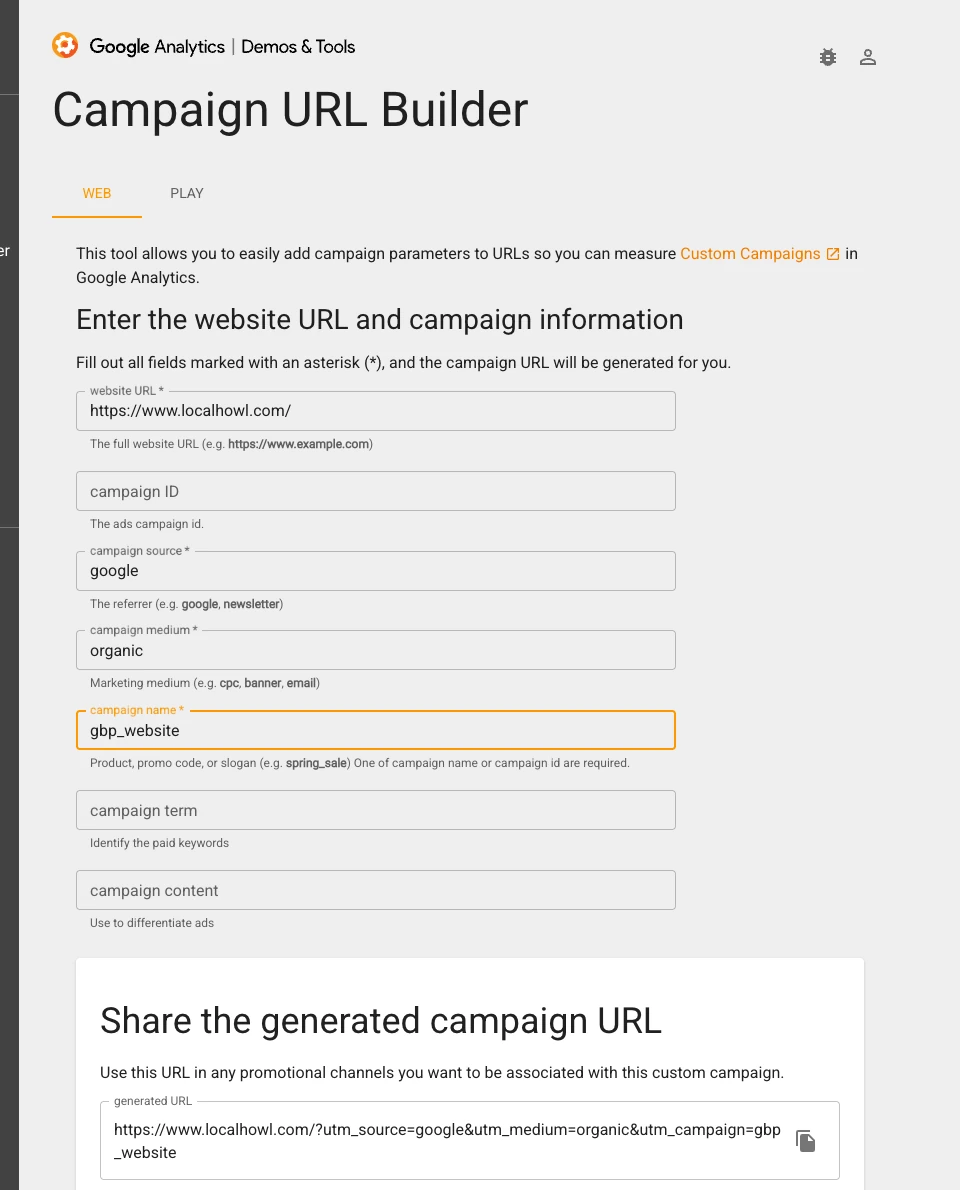
The fields become labels in the generated URL. This capture names the campaign gbp_website, while the examples below use gbp: choose one label and keep its spelling and capitalization the same every time. Test the link and check that analytics receives the values. These are demonstration inputs in the real tool, not a report of visits or sales.
Open the Campaign URL BuilderIf you’ve never heard of a UTM tag before, don’t worry. Here’s what it is, and how we use it to show what’s working and what needs improvement.
What’s a UTM tag?
UTM parameters are labels added to an external link so analytics can classify visits from that tagged link. They describe the link’s campaign context; they do not identify every visitor or recover unmeasured activity.
Here’s a link without a UTM tag: www.yourwebsite.com
Here’s the same link tagged for a Yelp listing: https://www.yourwebsite.com/?utm_source=yelp&utm_medium=referral&utm_campaign=local_listings
Analytics can use those labels to group eligible visits from that link, subject to consent, redirects, tracking coverage and attribution rules.
PUT IT TO WORK
Give the link a label you can follow.
Example tagged link
https://www.localhowl.com/?utm_source=google&utm_medium=organic&utm_campaign=gbp- Source: google
Identifies where this labeled link is placed.
- Medium: organic
Groups the visit under the chosen marketing channel label.
- Campaign: gbp
Separates this profile link from other labeled links.
- Check the visit, then the inquiry
Use the exact campaign labels in analytics. Review a configured form or call event separately, then confirm business outcomes in your CRM when the records can be matched.
Consistent labels help you see which links bring visits and where customers take the next step. They do not turn a visit into a lead on their own.
Example URL using Local Howl’s website. Choose campaign labels that match your own analytics setup. Google campaign URL guidance · Research method
How to read this example

Why does UTM tracking matter?
It helps you answer big questions like:
- Which directories are actually sending traffic to your website?
- What happens after someone clicks a link on your Google Business Profile or Yelp listing?
- Which tagged sources are associated with measured calls, form submissions or bookings?
UTM labels add campaign context to analytics. Untagged referrals and organic search can still provide useful source information; no single tracking method gives a complete account of customer activity.
How we set it up at Local Howl
Agree the tagging, analytics access and implementation scope before work begins. A practical process is:
1. We benchmark your current website traffic
We start by connecting to your Google Analytics and Google Search Console. This helps us see how many people are already coming to your website, and from where.
2. We tag your URLs with UTM parameters
For your Google Business Profile website link: https://www.yourwebsite.com/?utm_source=google&utm_medium=organic&utm_campaign=gbp
For your BBB website link: https://www.yourwebsite.com/?utm_source=bbb&utm_medium=referral&utm_campaign=local_listings
These are examples, not universal rules. We keep your tags consistent with how your reports are set up, we never put names, emails, phone numbers or other personal information in them, and we don’t add UTM tags to links between pages of your own website.
Each platform gets its own consistent source label. If Yelp, BBB and Apple Maps all reused your Google Business Profile link, you couldn’t tell their visits apart.
3. We update your listing links
We add the right tagged link on each platform that supports one, then test that any redirect keeps the tags and the page still loads. We record which listings in your local SEO footprint took the update and which stayed unchanged. Updates aren’t automatic, and coverage is never complete.
That redirect test matters. When we checked the redirects on our own new website in October 2026, a retired URL sent visitors to the right new page but dropped its utm_ parameters on the way, so the visit would have lost its label. Point every tagged listing link straight at the final URL, not at an old address that redirects.
4. We track conversions too
After tagging the links, check the next step you want to measure, such as a form submission. Confirm that the event is configured and compare measured activity with received inquiries.
Whether your goal is:
- Phone calls
- Form fills
- Service bookings
- Free class signups
- Menu views or reservations
Configured events can report measured interactions associated with eligible tagged visits. Reconcile actual received requests and customers separately, and disclose activity that tracking cannot attribute. For phone calls, see how call tracking with Twilio works.
What’s the ROI of a website click?
Knowing how many clicks you’re getting is one thing. But what’s the value of those clicks?
We’ll help you figure that out using simple math:
- How many site visits turn into real customers?
- How much is each customer worth to you?
- How many actions does it take to land one sale?
Illustrative example, not a client result:
- You get 10 phone calls per 100 visitors
- 1 out of 10 books your service
- That customer is worth $1,000
- $1,000 ÷ 100 = $10 in customer value per website visit before costs
This is customer value per website visit, not $100 per visit or a verified return on investment. If the $1,000 is lifetime value, it is not revenue earned during the reporting month.
To evaluate return, use your own received inquiries, customers, attributable revenue or margin, and acquisition costs. Platform clicks and call-button interactions are not the same as answered calls or booked work.
See what your website visitors are really doing
Use the labels to compare measured visits from different placements. Then review any associated form or call events and confirm outcomes in your business records.
- Where did they come from?
- Did they book a service?
- How many clicked the “Call Now” button?
- Are your new listings performing better than your old ones?
Combining supported call-tracking and analytics data can reveal additional parts of the customer journey, subject to consent, tracking coverage and attribution limits. Review local SEO reporting for the source definitions and distinctions.
Want to build tagged links yourself? Try the free UTM builder.
Build a tagged link and follow a test visit
Agree the labels before editing listings
Create a sheet with the listing, destination URL, source, medium and campaign. The example in this guide uses
utm_source=google,utm_medium=organicandutm_campaign=gbp. Source names where the link lives; medium gives its marketing classification; campaign gives you a label to find in reports. Use the same spelling and case each time. Google’s campaign URL guidance explains these parameters and notes that their values are case-sensitive.Build and open the full link
The example becomes
https://www.localhowl.com/?utm_source=google&utm_medium=organic&utm_campaign=gbp. Use your own final destination and agreed labels. Open the link and confirm that it loads the intended page. If it redirects, check whether the parameters survive. During an October 2026 check of our own new website, a retired URL reached the new page but dropped its UTM parameters. Linking straight to the final URL avoids that particular failure.Save it and test the public placement
Add the link where your profile or directory supports it, then open the saved public link. Verify the destination again because a platform may handle a URL differently from your browser. Give each publisher its own source label. Reusing the Google-tagged URL on Yelp would label those visits as Google too. Keep personal information out of the parameters, and reserve campaign tags for external placements rather than links between pages on your site.
Check the report and the next action
In Google Analytics, look for the chosen source, medium and campaign in the Traffic acquisition report after the test is processed. Confirm that the setup captures eligible visits; consent choices and analytics configuration affect coverage. Review configured form or call events separately. A labeled visit establishes measured website activity from that link. Confirm an actual inquiry or booking in your business records before attaching those outcomes to it.
What it actually takes to do this yourself
You’ll need consistent tags, links that keep those tags and analytics configured to read them.
- Tools
- A UTM builder, a naming sheet and an analytics setup that reports on the tags.
- Access
- Manager access to the profile, logins for each directory and access to analytics.
- Know-how
- A naming convention. How analytics groups traffic. How to check a tagged link still works.
- Upkeep
- Applying the same naming rules to new links and rechecking links after updates.
Where owners get stuck
- Different spellings of the same source across links.
- Tagging the website link but overlooking other supported placements.
- Losing parameters or breaking a destination through a redirect.
- Adding tags without checking the analytics report that should read them.
How Local Howl can help
Your program sets the scope. We’ll agree on who handles each task and how we’ll report it.
DO IT YOURSELF
You can create a naming sheet, use a URL builder and update supported listing links yourself. Test the public link and check the matching analytics report before expanding to more placements. Keep the sheet current when a page address changes or someone adds a new campaign so future reports use the same labels.
- Agree on a naming convention
- Build the tagged links
- Add them to supported placements
- Test links and redirects
- Set up the analytics report
- Keep the naming consistent
We can organize the links and reporting, so you can see which supported placements send tracked visits.
WITH LOCAL HOWL
A tag is useful only if it survives the link, reaches the right page and appears in analytics. We can set a naming convention, update the supported links in your plan and test that whole path. You can then compare identified visits with inquiries, instead of trying to work out where everything came from after the fact.
- We agree on a consistent naming convention
- We add tags to supported profile and listing links in scope
- We test the links and check how visits appear in analytics
- We report the traffic those tags identify, separately from inquiries and sales
Guidance checked November 18, 2026. Read the source: