
Start here: Use the same service query, business and grid settings for repeat scans. Read the whole map alongside the share of points in the top three. One strong position near your shop does not describe coverage across your service area.
LOOK AT THE EXAMPLE
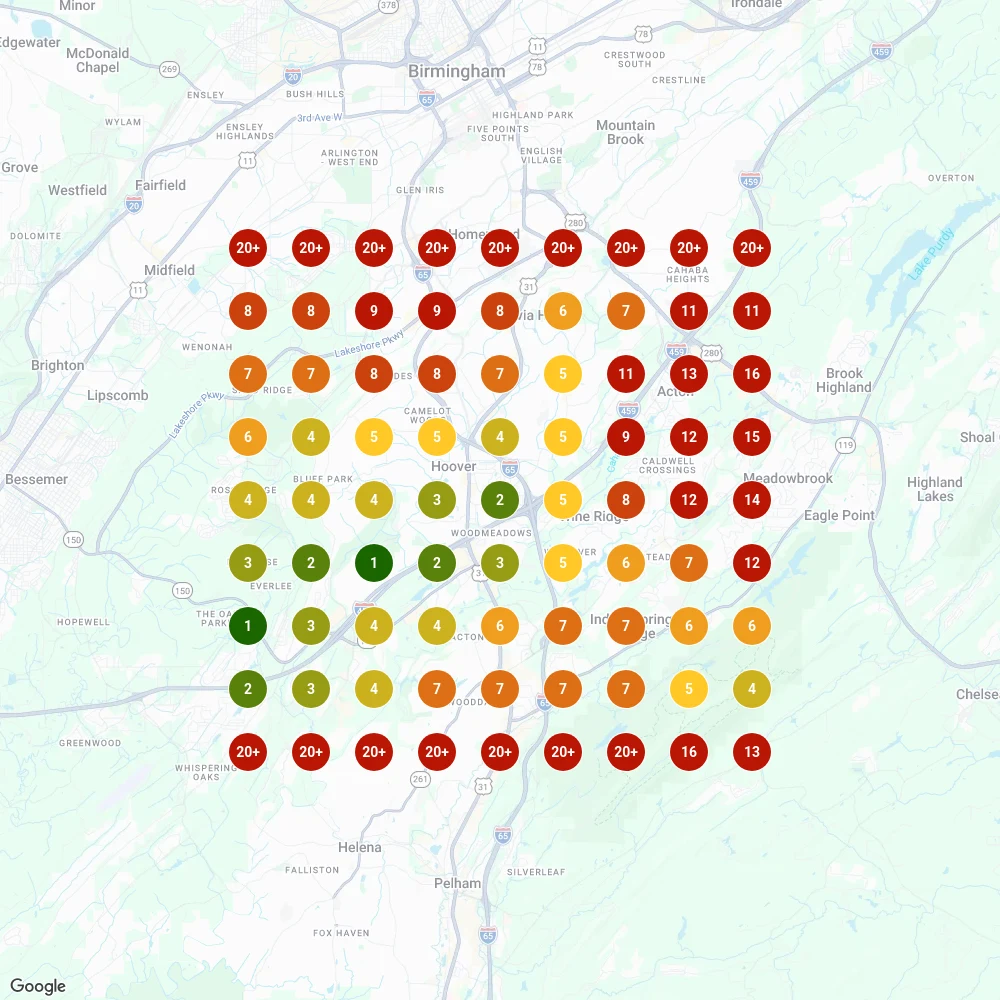
First check the search, date and area. Then compare the center with surrounding points. Green dots show top-three positions in this report; a 20+ label means the business was beyond the report’s first 20 results at that point.
Open the full reportWhat is a local search grid?

A local search grid is a tool that maps how your Google rankings vary by location. Instead of telling you your rank overall, it shows where you show up, and where you don’t, across your city or region.
Each dot represents a location where the tool runs the selected search. Its color summarizes the position found there at the time of the scan.
Read the individual results as well as the overall score. Being outside the top three at a point is different from being absent from all results returned by the scan.
FROM OUR RESEARCH
One good spot is not the whole service area.
Both numbers come from the same search: “hvac mountain brook al.” Looking only at the center would have missed most of the picture. We check the same service from locations across the area, so you can see where customers are finding you and where coverage needs work.
Cool Breeze, Inc. client scan, June 2, 2026. A 9 × 9 grid with a five-mile radius. See the full scan · Research method
How to read this example

Three measures to read alongside the map
Local search grids give you a visual, but it’s the data behind the dots that drives strategy. These are the three numbers we use, defined the same way as in our case studies.
Average rank where found (ARP)
What it is: the average of your positions at the grid points where you appear in the top 20.
Why it matters: it shows how high you rank in the places you already show up.

Caution: ARP can look worse as you grow, because it starts averaging points farther from your location. For Eric Kjelshus Energy Heating And Cooling, ARP for “energy audit near me” went from 3.30 to 5.75 between March 5 and August 31, 2026, while the number of points where it appeared tripled, from 20 to 60.
Average total rank (ATRP)
What it is: the average across every grid point, counting any point where you are not in the top 20 as 21.
Why it matters: lower is better, and it doesn’t hide the points where you’re missing. It’s the steadiest number for judging direction.
Share of local voice (SoLV)
What it is: the share of grid points where you rank in the top three, the spots that make the Google Map Pack.
Why it matters: SoLV shows how often you make the shortlist, not just how often you show up. It’s the number to watch against your competitors.

Example: If you’re in the top 3 at 7 out of 10 grid points across your map, your SoLV is 70%.
What a grid helps you investigate
A search from your own location gives you a useful but limited view.
Compare results across the area to find weaker coverage and identify the businesses appearing there.
Search grids help you:
- Pinpoint weak spots
- Identify local competitors
- Measure progress over time
- Make smarter SEO decisions with real, location-based data
How we track and improve your local visibility
We use map results to choose where to investigate your profile, website and competing businesses.
- We scan your current grid to see where you’re ranking, and where you’re not.
- We track your competitors’ grids to see who’s outranking you, where, and for which keywords.
- We prioritize dots that matter most: neighborhoods with conversion potential.
- We use the findings to prioritize supported profile, website and listing work, then compare later scans.

Choose an area that fits your business
A strong position is useful only when the search and location fit the work you want.
Consider how far customers travel to you, or how far your team travels to them. Use actual customer locations and job requirements to choose the area worth measuring.
Agree which neighborhoods and services matter before setting up the grid.
One scan is not a trend
Our own client grids show how much a single scan can swing, even with the same keyword, grid and center.
- The Arcade Restaurant, Memphis: across 13 scans from March 5 to October 5, 2026, average total rank for “best breakfast memphis” stayed between 7.99 and 10.54, while top-three share swung between 1.23% and 20.99% on single scans.
- Cohens Electronics and Appliances, Montgomery: three scans of “gas grill store” on September 22 and 23, 2026 put its top-three share anywhere from 17.28% to 32.10%.
- Eric Kjelshus Energy Heating And Cooling, Greenwood: one July 15, 2026 scan showed a 13.58% top-three share for “indoor air quality testing near me”, and the next scans fell back to 1.23% and 2.47%.
Use average total rank for direction and share of local voice for the top three, and compare several scans with matching settings before calling a change.
How often should you check your local rankings?
Check your grid monthly, and judge the trend over several scans rather than one. Look again anytime you see a performance shift. Here’s what we look for:
- New areas turning green (top 3)
- Drops in SoLV
- Rising competitors in key neighborhoods
- Dots that plateaued (so we can pivot the strategy)
Repeat the comparison over time and review sustained changes alongside your profile and website work.
Once you’re tracking your own grid, the next step is to compare local rankings against the competitors holding the top spots.
Compare scans using the same query, business, grid center, spacing or radius, provider and available device and language settings. Record dates and exports. Location and settings can change the result; differences are observations, not proof that one edit caused them. Keep visibility separate from traffic and received requests in local SEO reporting. Post activity belongs in its own column too; see what post view counts can and can’t tell you.
Use coverage gaps to choose the next investigation
Search grids show where a listing was observed for selected queries and map points. They do not measure lost leads or explain every difference between competitors.
Use scan observations alongside accurate profile information, relevant website content and verified business facts when choosing work to investigate.
Our Google Maps SEO services explain the broader implementation scope to agree before acting on grid observations.
Read a real grid, then set up your own comparison
Read the query and scan settings first
Open the Cool Breeze example in this lesson. It measures "hvac mountain brook al" on June 2, 2026, using a 9 × 9 grid with a five-mile radius. That means 81 tested locations for one selected query. Before reading the colors, check the business, date and coverage area. These details define what the map can tell you.
Compare the center with the whole grid
Cool Breeze ranked #2 at the center, while 11 of the 81 tested locations were in the top three. The other 70 points were outside the top three; that does not mean the business was absent from Google at those points. Select individual points to inspect their results. A strong center can coexist with much narrower top-three coverage, so keep both measures in your review.
Choose settings that fit your customers
For your own scan, choose a service you provide and check estimated search demand. Draw the grid around the places you genuinely serve, considering where customers come from and where you want to take work. Record the query, business, center, radius or spacing, grid size, provider and available device and language settings. More points and queries can increase scan costs; start with a setup you can afford to repeat.
Repeat the scan and investigate the pattern
Use matching settings for later scans and keep the exports. Compare several observations before calling a change a trend. If a section stays weak, review the businesses appearing there and compare your service information, profile and website. The grid identifies where to investigate; it does not prove which edit will change the result. Keep map coverage separate from website traffic, received inquiries and booked work.
What it actually takes to do this yourself
Useful comparisons start with the right searches and a repeatable scan setup.
- Tools
- A paid grid rank tracker and a keyword tool with real search volume.
- Access
- Your profile details and a clear picture of your true service area.
- Know-how
- Choosing keywords, grid size and spacing that produce useful comparisons across your market.
- Upkeep
- Repeat scans on a fixed schedule, then work on the weak areas the scan shows.
Where owners get stuck
- Treating a search from the shop as a picture of the whole service area.
- Choosing keywords for favorable results without checking relevance or demand.
- Collecting scans without reviewing the gaps they show.
- Changing keywords or coordinates without recording how the comparison changed.
How Local Howl can help
Your program sets the scope. We’ll agree on who handles each task and how we’ll report it.
DO IT YOURSELF
You can choose a grid tracker, start with a few important services and keep the settings consistent. Save each scan with its date and notes about any business changes. Your knowledge of which neighborhoods you serve and which jobs you want makes the scan more useful.
- Pay for a grid tool
- Pick keywords with real volume
- Set grid size and spacing
- Scan on a schedule
- Compare the profiles and websites appearing in weaker areas
- Make the supported changes and repeat the scan
We can handle the scan setup and interpretation, then connect the findings to the work in your plan.
WITH LOCAL HOWL
Buying a scan is straightforward. Choosing the right searches, setting a useful grid and deciding what the weak spots mean takes more work. We handle the scan setup and competitor research, then connect it to changes in your profile, website and listings. Repeat scans help you see whether coverage changes for the same searches.
- We choose searches that fit your services and check demand
- We set up map scans around the area you actually serve
- We explain where coverage is strong and where to investigate
- We repeat comparable scans to review changes after the work
Guidance checked November 18, 2026. Read the source: