
Start here: Check the answers, sources and website access for relevant searches. Improve the facts and pages you can control, then repeat the check.
So how do you rank in Google AI Mode, or show up when someone asks ChatGPT? There is no secret switch. Google and OpenAI both publish guidance, and most of it is the same work as good local SEO: a current Business Profile, consistent listings and pages that answer real questions. This guide covers what they say, what the research shows and what we build for clients.
What is Google AI Mode?
Google AI Mode is Google’s AI-powered way to search. It sits alongside AI Overviews, the AI-generated summaries that appear at the top of some results. Both use artificial intelligence to generate answers based on your query, pulling in data, summaries, directions, recommendations, and more.
This is from Google’s own site:
FROM OUR RESEARCH
We checked our own business.
The search was “local seo agency kirkwood.” We can inspect the answers and the sources the scan returned, including our website and agency listings. That gives us a starting point for checking how clearly the web describes a business and which services and locations appear in the answers.
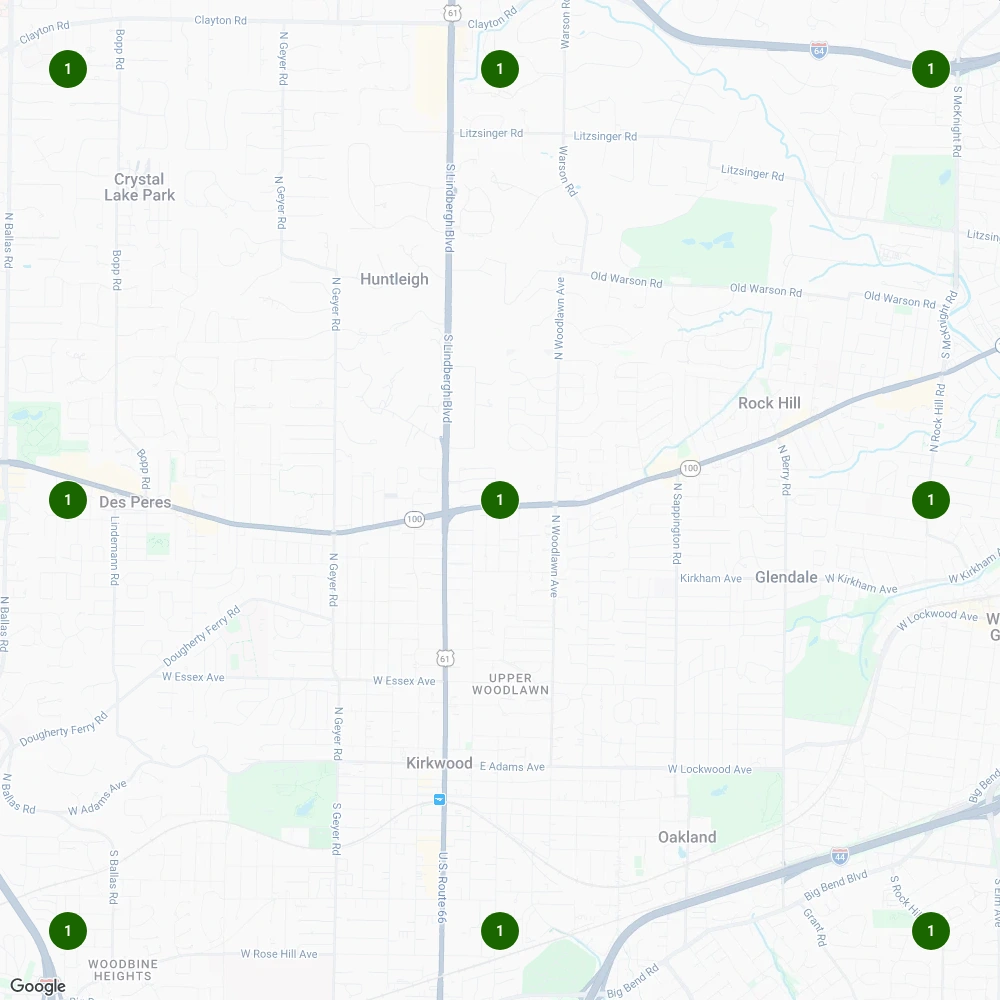
Local Howl’s own Local Falcon ChatGPT scan, November 17, 2026. A 3 × 3 grid with a two-mile radius. See the ChatGPT scan · Research method
How to read this example

How to review visibility beyond website visits
Customers may read a search answer before opening your website. Review the answer itself alongside any visits or inquiries you can measure.
Search visibility can include both ordinary results and links within AI answers. Check whether your business appears for the questions customers ask, then inspect the sources cited and any visits you can measure.
That means:
- Google is prioritizing accuracy and consistency across your business listings
- The content in your Google Business Profile matters more than ever
- You can’t rely on web traffic alone; you need to be discoverable in the search result itself
What Google requires from your website
Keep your website useful and current. Google’s published guidance says its AI search features do not require a new machine-readable file or special markup.
What Google says about succeeding in AI search
Google’s core advice for businesses in the AI era
“The underpinnings of what Google has long advised carries across to these new experiences.” (Google Search Central Blog)
In other words, you don’t need to create special AI-targeted pages. But your existing content needs to be helpful, accurate, and relevant. That means writing with clarity, solving real user problems, and making sure your site and listings are well-structured.
High-quality, people-first content still wins
“Focus on making unique, non-commodity content that visitors from Search and your own readers will find helpful and satisfying.” (Google Search Central Blog)
Google recommends the same SEO fundamentals for AI features, including helpful content and current Business Profile information. Keep service descriptions and business facts accurate, and check what sources appear for the questions relevant to your business.
AI Overviews show a range of sources
“AI Overviews display links in a range of ways, and show a wider range of sources on the results page so it’s easy for people to click out and explore content on the web.” (Google Search Central Blog)
Inspect the sources an answer actually cites for your target question. Where your business appears in those sources, check the facts and correct outdated details through the appropriate account.
No special files or markup required
“There are no additional requirements to appear in AI Overviews or AI Mode, nor other special optimizations necessary.” (Google Search Central, AI features)
The same page says a page must be indexed and eligible to show with a snippet in Google Search to appear as a supporting link. Its list of best practices includes making sure structured data matches the visible text on the page and checking that your Business Profile information is up to date. It also says you don’t need new machine-readable files, AI text files or special schema to appear.
One detail explains how AI Mode picks pages. Google says AI Overviews and AI Mode may use a “query fan-out” technique, issuing multiple related searches across subtopics to build one answer. For a local business, a page that also answers the follow-up questions (cost, service area, timing, what to expect) gives AI Mode more to work with than a page that only repeats the main keyword.
What businesses should do right now
This isn’t about panic, it’s about preparing. Here’s how to stay ahead of the AI shift:
Treat your Google Business Profile like your homepage
Because in AI Mode, it basically is. Make sure your services, categories, photos, reviews, hours, and posts are accurate and descriptive. Fill in the attributes that apply to you, such as online appointments, accessibility or service options. Google adds new attributes from time to time, so check back rather than setting it and forgetting it.
Shift from click strategy to discovery strategy
Focus less on driving traffic to your site and more on answering the exact questions your customers are asking, inside the Google ecosystem.
Use structure over style
Keep important business facts accessible in page text, including your contact details. Review relevant listings for factual conflicts. Schema markup should describe visible information accurately; Google does not require special AI markup.
Do not forget the bigger picture: AI is expanding search behavior
Google AI Mode isn’t the only force at play. Generative AI tools like ChatGPT, Gemini, Claude, and Perplexity aren’t replacing Google, they’re expanding how people search.
In fact, a Semrush study found that users who adopted ChatGPT between January 2024 and June 2025 did not reduce their Google searches. Instead, they added AI tools to their search toolkit.
For your business, that means visibility now has two fronts:
- Your Google Business Profile
- Your discoverability inside AI-driven platforms
Optimizing only for Google rankings isn’t enough anymore. Your presence in both local search and conversational AI tools will increasingly decide who gets found first. This is where Generative Engine Optimization (GEO) comes in, a new approach to earning visibility inside AI-generated answers. Our post on SEO vs. GEO explains the difference.
What the research says about showing up in AI answers
A few findings are worth knowing. Each is one study or report from 2025, not a rule that holds for every search.
AI answers often reflect your Business Profile
AI answers can contain outdated or incomplete business details. Check the answers for the questions your customers ask, inspect the cited sources and correct inaccurate information on the website or listing you control. Check each platform you want to measure.
ChatGPT often searches the web before it answers
A Nectiv Digital study, covered by Search Engine Land, found that about 31% of the prompts it tracked in ChatGPT’s web-connected version triggered a web search. Most of those searches were phrased like Google queries, asking about reviews, comparisons, features, and pricing. Clear, current pages that answer those questions are what an AI tool has to work with.
ChatGPT can only cite pages its search crawler may visit
OpenAI says ChatGPT’s search features use a crawler called OAI-SearchBot, and that sites opted out of it will not be shown in ChatGPT search answers, though they can still appear as navigational links. If you want to show up in ChatGPT, check that your robots.txt file allows OAI-SearchBot. OpenAI also says a robots.txt change can take about 24 hours to reach its search results. (OpenAI crawler documentation)
For ChatGPT search, inspect the answers and cited sources for the services and cities you want to be found for. Review crawler access separately from the accuracy of the business information those sources publish.
Searches are getting longer and more conversational
Google’s Head of Search, Liz Reid, said in a 2025 interview that people are typing longer, more conversational searches. Google has also launched Search Live in the US, where people can ask a question out loud or point their camera at something and get an AI answer in real time, and has tested Gemini Live inside AI Mode for spoken back-and-forth. Write the way your customers talk, and answer the questions they actually ask.
AI answers blend sources and follow topics, not exact phrases
Semrush research on Quora and AI Mode found Quora in 7.25% of the AI Mode answers it studied. The AI answers overlapped less than 50% with the closest Quora reply, and the similarity between prompts and Quora question titles averaged just 0.1. In plain terms: AI Mode paraphrases and combines sources, and it picks content that covers the topic, not content that repeats the exact search phrase. Answer engines like Perplexity work in a similar spirit: they compile an answer and show where it came from, so businesses are competing to be cited, not just clicked.
Reviews feed AI summaries in Google Maps
Google Maps added “Know Before You Go” tips that use Gemini to pull short snippets from reviews and other sources, covering details like parking or reservations. Honest, specific reviews from real customers give those summaries something useful to say. Ask every customer for honest feedback in their own words; don’t script what they write.
Ads can appear inside AI Mode answers
Google has been testing ads inside AI Mode answers, and Search Engine Land reported those tests expanding in late 2025. Paid and organic visibility now sit side by side inside the answer, which makes accurate listings and clear content even more important for businesses that don’t advertise.
What this means for your local SEO strategy
Here’s how traditional ranking factors evolve inside AI Mode:
| Focus area | Traditional SEO role | AI-optimized local SEO role |
|---|---|---|
| Reviews | Influence rankings and trust | Feed Google’s AI with ongoing, review-rich signals |
| Service descriptions | Inform search relevance | Help AI identify your offerings at a glance |
| Media (photos/videos) | Improve engagement | Signal profile activity and relevance to AI |
| Broader search presence | Target keywords and backlinks | Also aim for visibility in AI-generated responses |
Choose a small set of customer questions and keep a dated record of the answers and cited sources. Use that record to identify missing service details, factual errors and website access issues you can investigate.
Built to be read: what we add to client sites
On recent builds we add structured data that matches the visible business facts, plus a few small files written for AI tools. Hearthstone Pools in Marietta, GA has a dedicated llms.txt file. Reborn Roofing in Collierville, TN launched with full schema, llms.txt and ai-context.json. Wraps Redefined in Dallas carries FAQPage markup that answers “Do you install car wraps in Dallas, TX?” James Russell Roofing in Memphis adds machine-readable copies of its pages and an AI catalog file.
When we checked on October 22, 2026, all ten of the client sites we looked at served an llms.txt file, and none of their robots.txt files blocked AI crawlers. Google says those files are not required for its AI features, and nobody controls what an AI answer includes, so we treat them as low-cost extras, not a promise. See what our AI search visibility work covers.
Measure answers and customer activity separately
A recommendation in an AI answer is one measure of visibility. Website visits, received inquiries and booked work answer different questions. Keep those measures separate when assessing whether your marketing is helping the business.
That’s what we do at Local Howl. We build strategies designed to help your business show up in AI Overviews, Map Packs, and search answers. Nobody controls what an AI answer includes, so we focus on the accurate, useful signals you can control.
Review an AI answer and trace it to its sources
Record a useful customer question
Choose a question that matches your service and location. Save the exact wording, platform, date and location context so you can repeat it. Our example used “local seo agency kirkwood” in a Local Falcon ChatGPT scan on November 17, 2026. The scan covered a 3 × 3 grid with a two-mile radius. Those settings describe what was tested and help keep a later comparison meaningful.
Read the answers and cited pages
In that scan, all nine grid-point responses recommended Local Howl. The returned sources included our website and agency listings. Open the sources and compare what they say about the business, its services and location. Keep notes on factual errors or unanswered customer questions. Nine recommendations for one query are a result for that test; they do not establish visibility across other searches or show which website change caused a recommendation.
Check a page customers should find
Choose a relevant service page and read it as a prospective customer. Can you confirm the service, coverage area and next step without interpreting a graphic? In Search Console, inspect whether the page is indexed and review access issues. Google’s AI search guidance says the usual SEO practices apply and special AI markup is unnecessary. Resolve a specific access problem or missing fact before adding optional files.
Make one useful correction and recheck
Update inaccurate service information or improve an answer the page handles poorly. Where a cited directory contains outdated details, correct the listing through an authorized account. Save what changed and repeat the same query and settings later. Read the new answers and sources, alongside website visits and received inquiries where measurable. Responses can vary between checks, so keep several observations before treating a change as a dependable pattern.
What it actually takes to do this yourself
You’ll need to check what search systems can access and whether your business information agrees across the web.
- Tools
- Search Console, a crawler to test what bots can reach, schema testing tools and time spent asking AI tools about your own business.
- Access
- Your site’s robots.txt, your hosting or CMS, your business profile and your listings.
- Know-how
- Understanding crawler access, indexing and the guidance published by the search platforms.
- Upkeep
- Rechecking the setup when pages, business details or platform guidance change.
Where owners get stuck
- Blocking a search crawler through an overlooked website setting.
- Important service details that are difficult to find in the rendered page.
- Following a new tactic before checking the website and business information.
- Making changes without recording the searches or sources used to assess visibility.
How Local Howl can help
Your program sets the scope. We’ll agree on who handles each task and how we’ll report it.
DO IT YOURSELF
You can ask the questions customers ask, save the answers and inspect the cited sources. Correct your own website and listings where you have access. AI tools can help compare the text or draft clearer service answers; check every proposed fact against the business. Bring in technical help if an important page is blocked or its indexing needs investigation.
- Check what crawlers can reach
- Fix indexing
- Put key facts in plain text
- Complete the profile and listings
- Add accurate schema
- Keep up with what changes
We can check the technical foundations and the business information together, then agree on what to fix first.
WITH LOCAL HOWL
An AI answer can look convincing even when it describes the wrong service or cites an old page. We check relevant questions, inspect the sources and investigate the website or listing details behind them. Your program defines the changes we handle and the follow-up checks. You see the actual answers tested, rather than a promise that every AI system will recommend you.
- We check crawler access and search indexing
- We review how clearly pages explain your services and location
- We compare details across the website, profile and listings
- We prioritize the supported website and listing changes in your plan
Guidance checked November 18, 2026. Read the source: